This chapter brings physical access and computer forensics in one chapter since they employ similar methods, so the techniques of handling these threats are in many ways similar.
Physical access
This type of threat has to do with obtaining physical access to a device with the intention of stealing information or performing certain actions that can inflict damage to the user. Stealing information directly, installing malicious software and connecting external media are the most common attacks.
Let’s look at an example of a physical access attack. A perpetrator snooped on your password, personally or via a miniature camera near your computer. Then he has to wait for you to leave your workstation for a while so that he could install some spyware to your computer. The program will be running unbeknownst to you, collecting all the information and sending it to the perpetrator.
Spyware can be acquired absolutely legally, and mostly these programs are intended for parental control. Unlike malicious software, these programs require physical access to computer; RATs belong to a special type of malware that controls a system remotely without physical access to the device and administrator password.
The common functionality of such software includes recording what you do on your screen, recording all keys you press, controlling the perimeter using the web camera and microphone, creating easy-to-use reports about user’s activity. In addition to secretly collecting information, some of these programs can censor user’s activities, for instance, by blocking access to some sites.
How do you protect yourself from similar threats? First, you need to add fake symbols in your password, this will protect you from bystanders who could snoop on your monitor. You will learn how to add fake symbols in the chapter focusing on passwords. Second, you should install and set up Panic Button – the application that protects from unsanctioned access to a computer. You can take it a step further – there are freely available locks, safes and alarms for laptops. As you work through this course, you will learn about all these methods in detail.
Another common type of attack has to do with connecting external devices. For instance, a USB flash drive gets attached to your computer without your knowledge. As the system boots up with this USB memory, you get infected with malware.
The darknet can offer already adjusted USB flash drives, and the only thing a perpetrator has to do is to insert the memory stick into the victim’s computer in hope that he or she hasn’t read the materials of this course. You don’t always need a perpetrator to have your computer infected via an infected USB flash drive. Sometimes a virus can write itself into the flash-drive independently, while its owner turns out to be an ignorant victim.
After getting into your computer, malware often writes itself into all external media that will then infect more and more devices. A lot of Trojans, including the notorious Sality, ZeuS Citadel and Zeus Gameover, still spread using this kind of attack. This infection method was the most popular in the 2000s and is currently on the wane as more and more often files are passed through the web.
You will learn how to protect yourself from this problem, including how to create the trusted device lists and block untrusted devices, use USBkill software, open files in a sandbox. We will give you a breakdown of built-in protection mechanisms such as Secure Boot. You will get to test the security of devices by learning how to set up an analogous USB flash drive checking how protected your devices are.
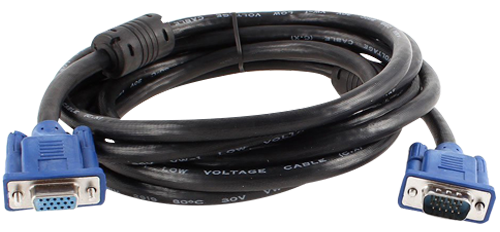
Actually, there are plenty of alternate methods to perform a physical access attack, for instance, a device with a spy implant can be attached to your computer. It may be a simple cable that connects your monitor to CPU. Indistinguishable in appearance from the normal device, it contains an implant that sends the perpetrator the readout of your monitor’s contents.
By the way, meet RAGEMASTER, an RF retro-reflector hidden in a VGA cable for spying. It has been used by NSA since 2008. For a decent amount of money you can get a similar solution fitted for any monitor models on the darknet.
Spy implants belong to advanced, state-of-the-art high tech solutions that are usually used for corporate and state spying.
Computer forensics
Computer forensic analysis is a tool kit for extracting sensitive information from digital devices. Computer forensics is applied, as a rule, by law enforcement agencies to recover evidence from suspects’ devices in course of the investigation. However, given that the techniques and software are freely available on the Internet, this tool can be used by any perpetrator.
Forensic analysis can be applied to desktop computers, laptops, tablets and smartphones. Forensic experts can deftly handle all popular operating systems: Windows, macOS, operating systems based on Linux, Android, BlackBerry и iOS.
The difference of computer forensic analysis from physical access lies in the specific technologies it uses. For instance, forensic analysis puts a lot of focus on the physical memory of the device which may store sensitive data such as encryption keys. In some cases a DMA attack is performed where an attacker gets direct access to physical memory. DMA attacks basically superseded Cold boot attacks.
Cold boot attack is the notorious attack in which the attacker cools physical memory in liquid nitrogen, extracts it from the device and then reads out its contents. The modern physical memory of the fourth generation (DDR4) and later is no longer exposed to this type of vulnerability.
If Cold boot attacks today are basically history, swap and hibernation files, the spaces located on your hard disk and used as the virtual memory extension of RAM, can still reveal a lot about the owner of the device if accessed.
Computer forensic experts often resort to data recovery on media, including in special labs. Even file deletion won’t protect it from being extracted during forensic analysis. Modern techniques allow to recover deleted files quite efficiently.
The bad news is that forensic analysis software is tailored for identifying and extracting images, videos, documents, correspondence in IM services, the information about applications being used, backup copies of devices saved to cloud storages, website history.
The good news is that our course will teach you how to effectively protect yourself from computer forensics. You will find out how to encrypt media, set up security policy, remove files reliably, set up Panic Button – the program designed for protection against forensic analysis. You will also learn how to handle swap and hibernation files, check your device for DMA attack vulnerabilities.
P.S. You can find out more about computer forensics tools and its capabilities by visiting the sites below.
The consequences you face when an intruder gets physical access to your system
The consequences you face when an intruder gets physical access to your system vary depending on his intentions. It can be a father who wishes to install a cyber spying application on his son’s computer (the so-called hidden parent control software) which enables him to ascertain that his son’s private communication and correspondence on the web is safe.
If you are an entrepreneur, and your secretary attempts to pass insider information to your competitor, sell it to hackers from the deep web or simply infect your corporate network with malicious software, you and your business will face far more serious consequences in this event. If you own an online marketplace for all kinds of drugs and your computer becomes seized by law enforcement agents, you will get a deserved life sentence like the notorious drug trafficker and darknet market operator of the Silk Road site Ross Ulbricht.
But there are other effects of compromised physical access you are not aware. First, you can be set up with digital proof: forbidden literature, extremist materials, child pornography, etc. In fact, this is a far more real threat than it appears on the surface, and this course reveals a few such stories.
Second, your cryptocurrency can be stolen, and this may be the main target for intruders. One day the representatives of Ukraine’s Security Service with two seizure witnesses visited the premises of Anatoly Kaplan, a Russian-speaking founder of the cryptocurrency magazine ForkLog, and upon showing him a search warrant, seized his entire equipment. The search was authorized under the investigation with ForkLog having an indirect bearing on the case, allegedly because it was used by the suspects for changing cryptocurrency. The ForkLog founder could’ve been simply summoned as a witness in the case, making the visit to his premises for seizing his property an unnecessary move. What made the law enforcement resort to such drastic measure? Obviously, Anatoly’s cryptocurrency...
According to Anatoly’s lawyers, already during the search, Ukraine’s Security Service officers attempted to transfer Kaplan’s bitcoins to their accounts, and the following day the Ethereum currency Anatoly kept in his wallet was transferred to an unknown wallet.
If you are a cryptocurrency owner, you should first and foremost guard against compromised physical access. In addition, I highly recommend you properly learn how to put in place secret secure passwords, methods of secret data storage and encrypted file-hosted volume disguise.
Third, your equipment can be destroyed. Let me tell you an engaging story. We often hear that users in Russia and other countries get fines and even real or suspended sentences for liking, commenting or reposting on social networks. But few users are aware that a fine isn’t the worst thing that can happen to you: the court may find your computer the instrument of crime subject to further destruction.
This story happened to Vladimir, a user based in Yekaterinburg oblast, who got accused of uploading videos to public view which were found to be extremist. And though the charges Vladimir faced were not uncommon, in addition to a fine, the court also ordered to destroy his computer. It was 2011 and the case served as a precedent for similar cases.
But the most high-profile case in Russia to date involved a single mother Yekaterina Vologzheninova that was sentenced to 320 hours of community service for a repost of images to her social network page which voiced her support for Ukraine. The court also ruled that her computer and mouse should be destroyed as an instrument of crime. To be honest, after seeing the images, I didn’t see anything extremist about them, but I’m not arguing the court’s decision.
A good computer or laptop costs over 2000$, it may contain sensitive information with no backup copies, therefore even if you liked or reposted out of mistake, you should make an effort to prevent unauthorized physical access to your computer. Think about it, to prove that a certain computer was used for publishing posts, one needs to gain access to it and perform a forensic analysis of the user’s activity on social networks.