• Academy
  • Proxy Shop
  • SMS Activation
  • Academy
  • Proxy Shop
  • SMS Activation
  • Theme
Telegramsupport@cyberyozh.com
AcademyProxy ShopSMS Activation
Telegramsupport@cyberyozh.com

Privacy PolicyCookie Policy

©2026 WebGears Services d.o.o. All rights reserved.

Course Interaction TipsShield, Mask, and Sword. Why We Teach Attacking.How to Follow the Publication of New MaterialsThe most important advice of the courseCheck your online anonymity and security. Tests.Help and answers to your questionsWhat do I learn from this course?The importance of donations
Cyber spyingDangerous searchTelemetryData leakagePrivacy violation and trackingMass surveillance systemsPhysical access and computer forensicsPeeping information on the screenMass hacking of devicesLoss of digital dataCyber-warfare, cyber diversions and cyber terrorismPlanting digital evidenceDeanonymization and unicalizationDigital identity theft
How hackers get caught sdafasdfsaedfThe fatal mistakes of cybercriminals
Why should I need privacy and security on the Internet?
Virtual machine and virtual operating systemCreating a virtual machineSnapshots and virtual machine cloningWhy you shouldn’t use shared folders, shared clipboard and Drag’n’DropEncryption of virtual data on virtual machine VirtualBoxThe information VirtualBox stores about usersVirtual machines’ vulnerabilities. How hackers go beyond the virtual environment.
Creating a secure passwordThe secrets of a strong passwordA huge mistake or how exactly you should not keep passwordsSecure ways to store passwordsPassword Managers or Ross Ulbricht's Fatal MistakeMiniKeePass is a password manager for iOS (iPhone / iPad)KeePassXС. Setting up a password manager for macOS.Emergency erasure of saved passwords
Operating Systems. Choosing your path.iOS. First steps to protect your iPhone and iPad.The myth about the incredible security of macOSQubes OS. System for those who have something to protect.
History of encryption. Rivalry between encryption and special agencies.Encrypted file-hosted volumesA brief history of TrueCrypt. Unprovability of encrypted file-hosted volumes.Your TrueCrypt is spying on youInstalling and setting up basic security in TrueCryptHow to install and set up basic security in VeraCryptVeraCrypt. VeraCrypt vs TrueCrypt.Creating and using a secure encrypted file-hosted volume with TrueCrypt / VeraCryptEncryption of external data storage devices with TrueCrypt and VeraCryptSecrets of working safely with encrypted file-hosted volumes TrueCrypt and VeraCryptAES Crypt. A straightforward, cross-platform solution for file encryption.Encrypting files with AES Crypt on Windows and macOSEmergency destruction of encrypted file-hosted volumesThe methods of breaking encrypted file-hosted volumes and how to protect yourself from them
Comprehensive encryption of operating system or hard disk drive
Forensic analysis of activities on social networksGaffes in social media that turned fatal for the careers of their authors
Tails. A few tips before you start using this operating system.
Total surveillance: good or evil?
Test: check email for hacking resistanceDeanonimization of email ownerSending Anonymous EmailsProtect data from leakage at the email recipient level
Cross-device tracking. Deanonymization of users of Tor, VPN, proxy using sound beaconsWhat you can find out based on the photos on the network.Timing attack. How the special services deanonymize the users of messengersHow the FBI obtains authentic IP addresses of criminals using Tor, VPN or proxyDeanonymization of VPN and proxy users through the User agent and browser fingerprintsDeanonymization of Tor users through bait filesHow to get a Telegram-linked mobile numberDe-anonymization of users of messengers using P2P-connection
Browser history through the eyes of an IT security professionalSecurity professional’s point of view about browser cache
Cloud Storage Threats
How to check if you are not being spied on your mobile phoneCyber spying through computer repair centersCyber spying through wireless keyboards and mice. “MouseJack” attack.Tapping premises using speakers and acoustic systemsCyber espionage through smart TVsCyber espionage through monitor emanation analysisUniversal method of deleting programs for cyber espionageHacking, erasure and cyber espionage via USB cables.Cyber spying through mobile phone
The secret to a secure loginTwo-factor authentication
BadUSB. The deadliest threat there is no defense for.Hacking the computer via hotkeys / shortcut keysDangerous flash drives. What can USB connection lead to?
Data theft with an attack “web cache deception”The danger of capital letters or forever working phishing scheme
How do they figure you out by IP addressWhat blacklists are for and the consequences of having your IP address on a blacklist
General principles of secure communication in the networkDisrupting the continuity of correspondence. One-time-use note services.XMPP (Jabber). How do they communicate in darknet?Bitmessage. The most anonymous messenger.A trap for hackers: checking if someone is reading your correspondence.Encrypting your correspondence in a browser.Link substitution in messengersFour secrets of safe communication for hackers
The secrets of keeping your data concealedDisguise cryptocontainersThe 3 mistakes of Russel Knaggs, or 20 years of imprisonment for a “deleted“ email.Creation of double-bottom cryptocontainers
What is MAC address and how is it related to your anonymity?
Open and closed source codes. Errors and situational bugs.Audit of a list of installed programs and applications
Checking Data for Leaks
Data collection by software
DeepWeb or the hidden internet of Tor
Intro to PGP
Here’s how you will go through the training course on detecting and removing malicious softwareSafe opening of short linksAttack drive-by download, or secret download.
Preventive measures in order to preclude identity theftHow to check if your identity has not been stolenHow to delete your personal data posted on the network
Firewire attackPractical examples of using forensic analysis of photos and videos
Anonymous DuckDuckGo Search Engine
Counter forensics (anti-computer forensics)Secret threat or files from messengers
Hiding data on imagesView, edit and delete image metadata at macOS
Choose a protocol for VPN. Compare OpenVPN, PPTP, L2TP/IPsec and IPsec IKEv2Choose a reliable VPN: TLS authentication, connection port and session keyChoose a secure VPN: encryption algorithm, key length and data authenticationHow hackers and security services hack VPN
The security problems of SMS messagesSMS messages that self-destruct. How to check if your SMS are being read.Sending anonymous SMS
Electromagnetic systems for wiping data on hard drivesEmergency data erasure of the computer. How hackers cheat forensics.Emergency erasure of mobile phone and tablet
Collaboration with technical writersUser Agreement

Peeping information on the screen

Under the threat of being spied on, I mean the possibility of third parties to peep information on the victim's screen when they use their smartphone or laptop. At particular group of risk there are people loving to work in public places, such as cafes and restaurants.

Do not underestimate this threat, especially if you work with information of interest to your malefactors. I have already told how, through peeping, law enforcement agencies managed to decypher information on encrypted devices used by criminals.

But if you can protect the password from peeping with the help of this manual, then with other information, such as correspondence, the situation is more complicated. There are several solutions for protection, they can be divided into two groups, namely mechanical and software.

Mechanical anti-peeping solutions

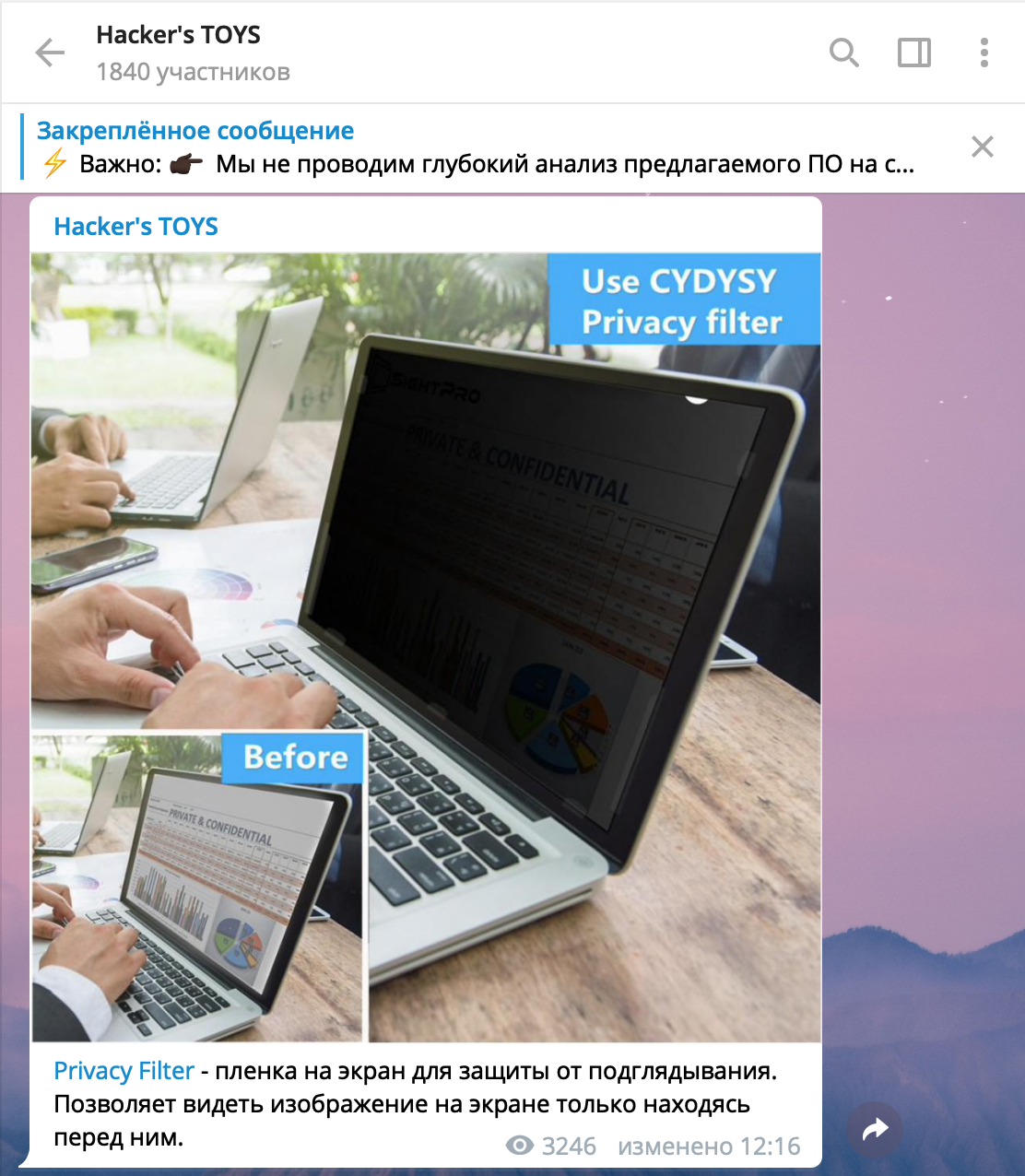
The simplest solutions are protective films for the screen. They allow you to make the image out on the screen only when you are in front of it and they hide the image from looking at the screen at an angle. This is an amazingly effective solution for protecting your smartphone, tablet, and laptop.

We have a Telegram channel, which is called Hacker’s TOYS, where we publish information about various solutions, programs and interesting services, there you can find information about the protective films with link to the product.
2019-03-09_00-20-30.png

There are laptops on the market in which peeping protection is built in by default, for example, a range of laptops with HP Sure View technology. Here is a video with its demonstration.

But the film is not the only solution I recommend. Its main problem is the lack of protection from peeping from the back, in other words, people on the sides of you will not see anything, but the person behind you will see everything as well as you will. But for protection and against this threat we have another solution.

At my first job, we had an office, where developers, system administrators, and, most unpleasantly, the bosses were sitting in one big room. From time to time, our manager liked to walk and check whether his subordinates were working or hanging out in ICQ.

The use of small mirrors remained the most effective defense, and soon almost half of the employees placed mirrors near the monitor for viewing the space behind their backs.


Residential ProxiesMobile Proxies
2019-03-09_02-05-55.png

Tip

If you have to work with valuable information in public places, get a protective film on the screen and a mirror to eliminate unnoticeable peeping from behind

In addition to the mirror, there is a much more elegant solution, that is the so-called self-adhesive mirror films, they are also called safe mirrors. It is necessary to purchase such a film, cut two strips and stick it on both sides of the camera of the laptop, this will allow you to control the space in the back without any extra tools.

Anti-peeping software solutions

It seems to me that it is unnecessary to use software solutions for this task, however, since I decided to highlight all the tools I know, let's talk about them as well.

In 2017, Google introduced an application that, using a neural network, ensures that no one spies on what is happening on the device screen. This video demonstrates visually how it works.

Regarding the drawbacks, there is the constant use of the front camera, what I absolutely do not recommend. Similar developments are for the computer, for example, the program PrivateEye.

The minus is the same, i.e. continuous observation through the camera, in my opinion, such a decision carries more risks than good things.

Solutions for geeks

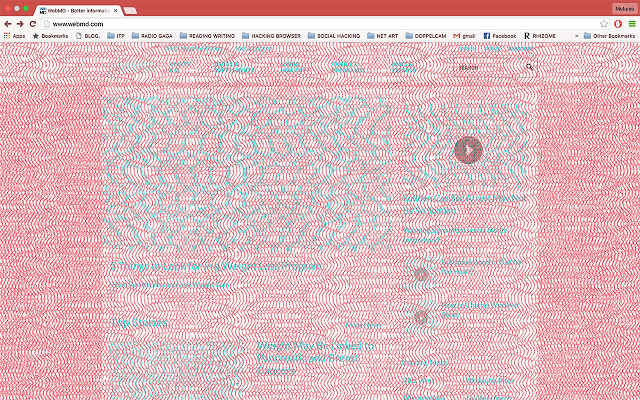
There is quite an interesting solution called Decodelia. This is an extension for Chrome, designed to protect from peeping. For everyone who wants to see what site you have opened in the browser, the image will look like this.

unnamed.jpg

To see the information on the screen, you must wear glasses with red glasses. An excellent solution, however, the need to wear glasses and the lack of protection for other programs, such as messengers, makes its use not very reasonable. In addition, I cannot say that Chrome is not the browser that cares about the protection of user data.

Threats

Physical access and computer forensics

Prev article

Next article

Threats

Mass hacking of devices

Group 1948760177.png