A search engine is a boon to life - it allows us to find the necessary information fast and easily. When the Internet first appeared, we had to wade through directories searching for the right websites, and now all you need to do is enter your query in a search bar, be it Google or Yandex.
Search is not only about search engines, we look for information about people on social networks, look for videos on Youtube, browse Wikipedia for fact-based information. It’s all very convenient and very dangerous. This chapter doesn’t reveal how Google seeks to know everything about you, collecting and storing information about you, how the search engine may keep records about the searches you wished to delete. We will focus on these topics in separate chapters of the course. In this chapter, I will tell you about different dangers posed by search engines.
SMS message leaks
You probably have used or heard about the option to send free SMS messages through a telecommunications operator’s website. This service is popular in some countries, for instance, in Russia. By sending an SMS, you never assume that your text messages will be seen by anyone who wished to do read them.
The users of the Megafon website who used its free online SMS service never thought this could be possible until one day they could see the indexed text messages purged by the Yandex search engine from its cache. Yandex’s cache kept the dates, texts and phone numbers of the recipients of the messages.
The unfortunate users could put the blame on the sitemap of the Megafon website that didn’t contain the instructions that forbid indexing the contents of the websites with the information about the sent SMS and Yandex.Metrika. The website with the SMS wasn’t supposed to be available to anyone except for the sender who, by clicking the unique link, could see the information about the SMS sent and its current status. But in the end, they became easily available to view online for all Internet users who were quick to post all kinds of comments on the most lurid of these messages.
Tip
Don’t send text messages through websites. Overall, don’t send sensitive information using SMS.
Document leaks
When Russia’s most popular social networking site Vkontakte introduced the option that allowed document uploading, it was quickly picked up by users who found it very useful to share files with other users.
However, by default all the documents uploaded were set to public, and their titles were indexed by the internal search of the social networking site.
Thus the search results showed the photos of credit cards, scans of ID documents attracting fraudsters. Every day they found new documents by entering queries “credit card” or “ID document” and then sold the sensitive information on the dark market or used it in an illicit manner.
However, the scammers quickly found themselves on the receiving end when the issue of publicly available documents raised a public outcry. The hackers forged documents that contained malware and posted them on the social network disguised as users’ credit cards and IDs. Many scammers had to pay a hefty ransom to have their data unlocked.
Tip
If you are posting a file or document somewhere, make sure that it is not visible to the public.
Private chat access leaks
Many users know that among other features the instant messaging service Telegram offers the option of private chats (groups). You can create a private chat, and no one except for the people you’ve invited can access it.
These chats contain personal information, sometimes corporate, confidential corporate data that are supposed to be known only to a restricted circle. To get access there, one need to get the administrator’s invite or click the secret link known only to the participants of the chat and…to the search system.
Unfortunately, the links to private chats weren’t protected from indexing, Google’s search system scanned them, and they became available to everyone. The problem was resolved only after an independent researcher discovered the vulnerability.
The researcher who found the weakness said that Telegram’s developers not only took too much time to answer him but didn’t even admit the scale of the problem. However, everyone who uses private chats to share sensitive information should have serious concerns about this huge oversight.
Tip
Don’t overestimate the security of Telegram’s private chats (group).
You are probably thinking how this chapter can help you become more protected and increase your security online. Don’t rush to conclusions: raising awareness about the existence of different threats is an important part of education. When you know different scenarios, you can deduce where the threat comes from, assess the reliability of this or that solution.
For instance, when posting a file, check if it is made public. When you send an SMS through a website, you will be aware of the risks of information leaks. When creating a private chat through an instant messaging service, you will go through the ways when people who are not allowed to join your chat can obtain access to the information in there.
Tip
Delete important information from private chats when it no longer holds value for the participants of the chat.
Yandex and Google Docs
One of the most high-profile scandals related to search engines has to do with the leak of Google Docs through Yandex search results.
How do you access documents on Google Docs? A document is loaded, you select sharing this document through a hyperlink, the link is sent to the receiver. This way the hyperlinks led to the files with highly sensitive data: corporate documents, passwords, evidence of Moscow city officials boosting turnout for the coming mayoral election, a retaliatory campaign reports against a rebellious blogger, financial statements – all this information was leaked to the public.
The most controversial document appeared to be the instructions for Tinkoff Bank’s HR employees. According to the text, the staff weren’t supposed to hire “members of the Negroid race”, members of the LGBT community, applicants who have to pray over the entire working day, former law enforcement, FSB members and bailiffs, men “of North Caucasian nationalities” (except for Armenians and Dagestanis with previous experience in banking) and people “with non-Slavic names”.
Attention
You can only share hyperlinks to the documents whose leak won’t bother you.
Tip
Instead of making a document accessible through a hyperlink, share access to the file for the recipient’s account.
If Yandex was able to index documents, therefore, in theory, a malicious intruder can do it too.
Tip
Review your files kept in the cloud, if there are sensitive documents with shared access through a hyperlink – disable it.
In addition, you should take measures against a possible leak of these files, for instance, if they were password protected – change the passwords.
Yandex and user’s personal data
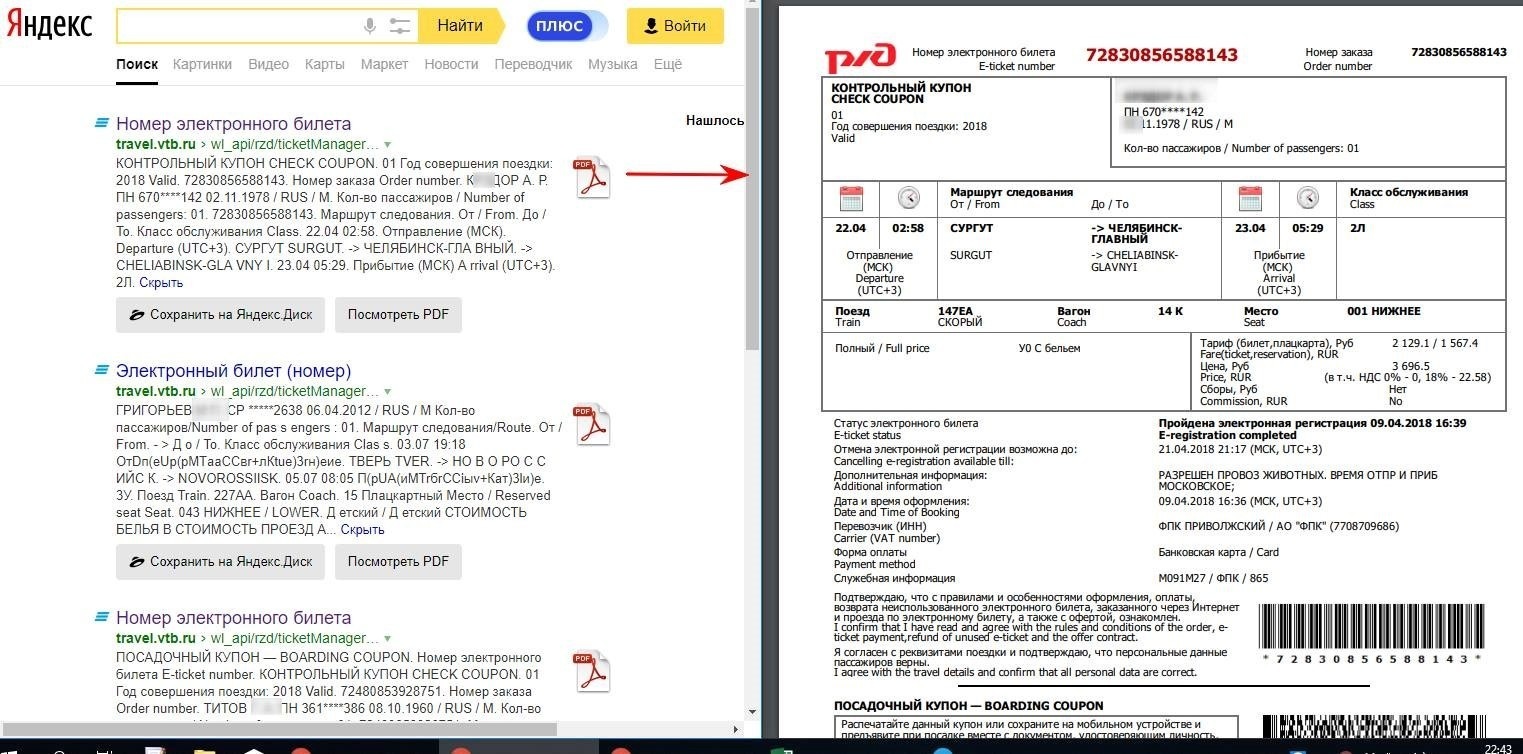
The summer of 2018 saw another scandal with Yandex involved, though through no fault of Russia’s largest search engine. An independent researcher examined personal data leaks online and found out that the Internet search results contained the details of the tickets bought on the website of Russian Railways, applications to the Transportation Department, including the complete text of these applications and copies of the attached documents and other personal data.
The list of the companies that suffered the leaks featured such banking industry giants like Sberbank and VTB. Below you can see the example of leaked data borrowed from the author’s material.
In this case the responsibility for the information leaked falls on the companies that failed to select the appropriate privacy settings shutting access to personal data and which often store user data in open access. Of course, the data that so easily turn up in search results is pretty enticing to scammers who can use it for a lucrative identity theft business. We recommend you check for any data that may have leaked online as well as take measures to prevent identity theft in the future.